
get started
Membership Management
Advertising network
The Advertising Report
Last Update :
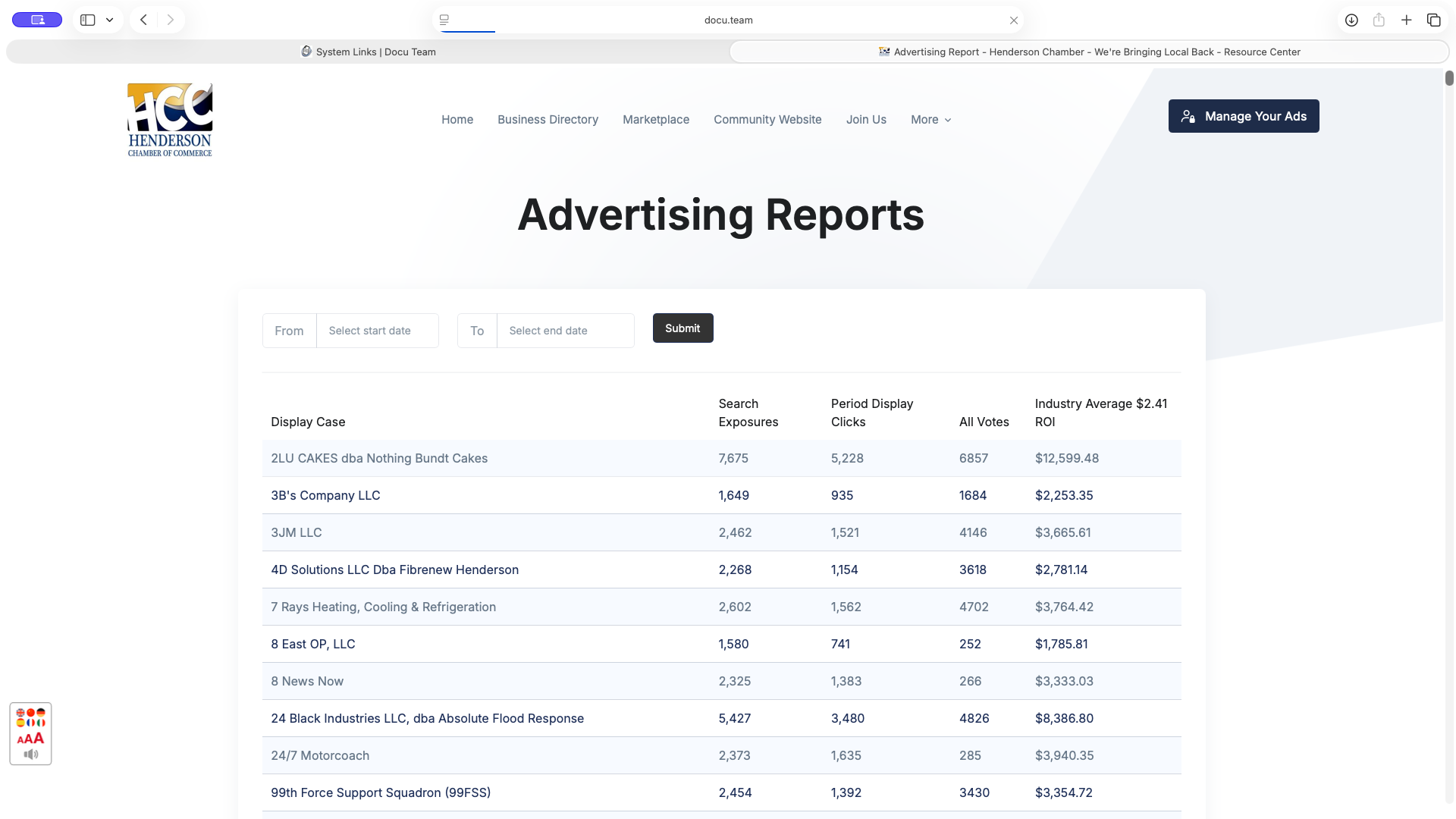
The advertising report shows you how your chamber is performing for you businesses. It does not include the directory hits for each businesses and instead shows you how their catalog items and offers are performing.
You can query the results by date range in this page.
There are 6 columns in the table;
- Display Case - This is the name of the business
- Search Exposures - This represents how many times the business was exposed through search in directory and search engines
- Period Display Clicks - This is the clicks or actual visit to the catalog pages on the specified perion
- All Votes - This is the total votes/likes garnered by items of the business
- Industry Average $2.41 ROI
-
This display click through value is calculated at an industry average of $2.41. (Wordstream 2024)
Formula: Period Display Clicks × $2.41 = ROI
How Click Data is Recorded
- One hit per visitor, per listing, per day - If the same person clicks or views the same listing more than once in a single day, it only counts once — no more inflation from repeat clicks.
- Business owners excluded - If a business owner is logged in and views their own listing, that doesn't count toward their own stats.
- Internal Chamber Nation staff excluded - Clicks or views from our own team (site admins, support staff, or catalog builders) while working on your account no longer get counted either.
Note : This new recording process is recently applied - September 5, 2026.