
get started
Membership Management
Advertising network
Quick Books Online - Mapping Products/Services to MMS G/L Ac
Last Update : August 2026
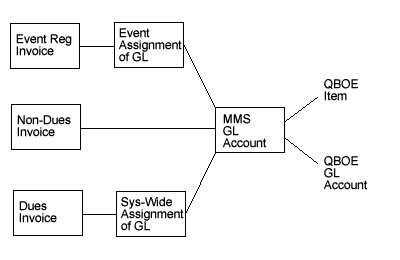
Most sales transactions in QuickBooks Online are classified as Products/Services. For example, most organizations will have at least one Product/Service for membership dues and another one for event registration fees. (Some organizations use separate Product/Services for each member plan, each event they host, etc.)
You will first need to create any Products/Services in QuickBooks Online, and then map them to the MMS. (For example, if you want to assign all transactions for an upcoming "Summer 2016 Conference" to a particular Product/Service in QuickBooks.)
Here is the step-by-step process:
1. Create the Products/Services in QuickBooks Online. (For more details on how to do this, please refer to Intuit's documentation.)
2. Log in to the MMS as an admin.
3. Go into Membership Billing.
4. Under the Data Export subheading, click "Edit General Ledger Accounts".
5. Click "Add New GL Account" at the bottom of the screen.
6. Select a Product/Service from the QB Item dropdown and enter a name in the Description field.
- To maintain your sanity, we recommend using the same description in the MMS that you use in QuickBooks.
- The Account Number field is optional. If you do use it, you must use a number (no letters or punctuation marks).
7. Press "Submit.
8. Repeat steps 5-7 for all of the Products/Services you need to map to G/L Accounts.
In section 6.15.3, we'll show you how to assign these G/L Accounts to transactions throughout the MMS.
F.A.Q.s
Q:
I have Products/Services in QuickBooks for things that I don't use the MMS for. Do I need to map them to MMS G/L Accounts?
A:
Nope. You only need to map the Products/Services that you will be offering through the MMS, you can ignore the rest. (This usually comes up when an organization has been using QuickBooks for several years and has Products/Services that they will no longer sell, e.g. "2009 Annual Conference".)
Q: What happens if I try to export a transaction that has not been mapped to a Product/Service in QuickBooks?
A: The system will give you an error, and halt the export process.