
get started
Membership Management
Advertising network
Adding a Job Post
Last Update :
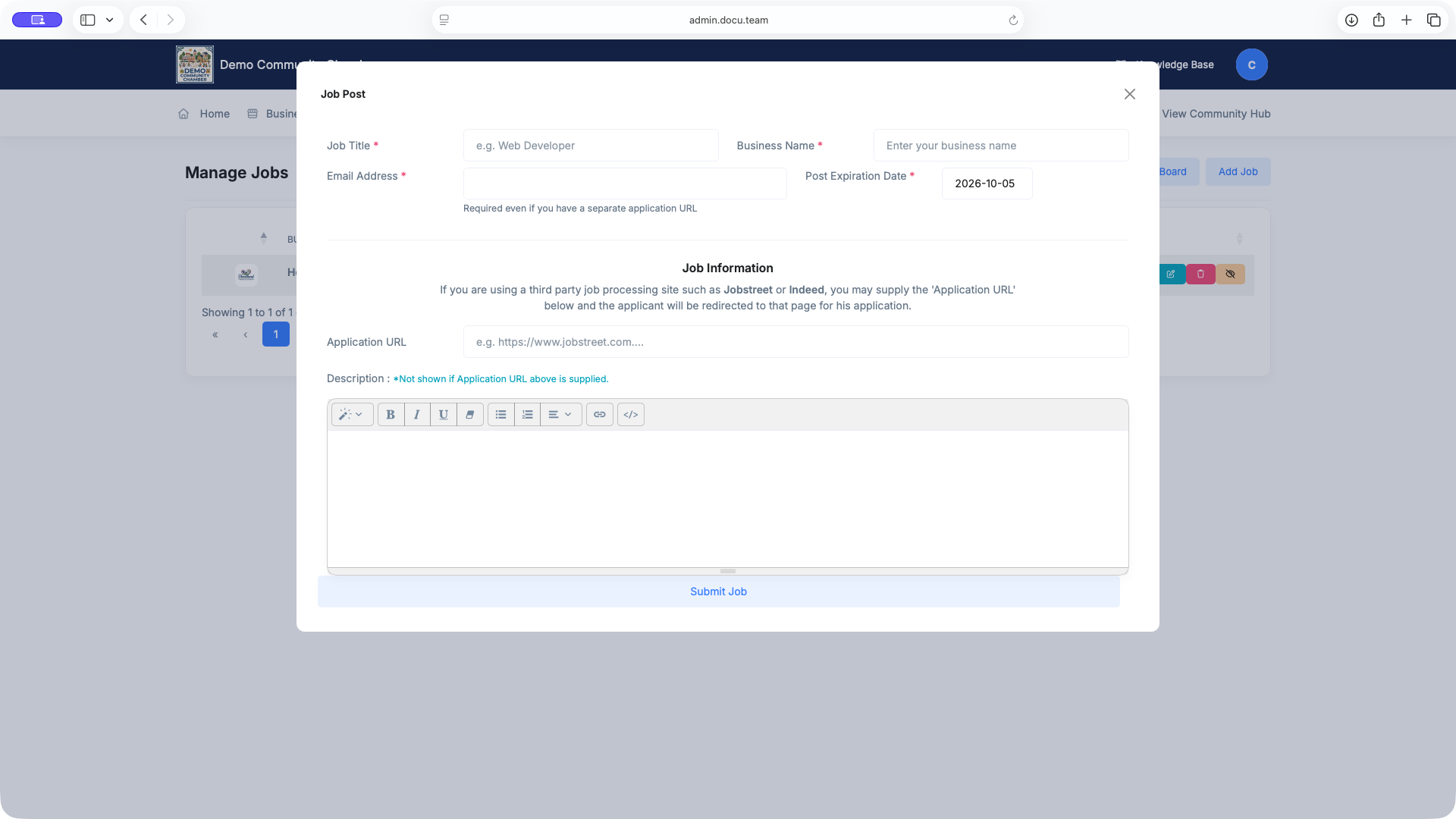
To add a new Job Post, go to Hub->Job Board->Add Job
Job Post Fields :
- Job Title
(Required) - The position being advertised — e.g.
Web Developer. This is the headline shown on the public Job Board listing. - Business Name (Required) - The employer's name, shown under the job title so applicants know who's hiring.
- Email Address (Required) - Enter this even if an Application URL is supplied below — it's kept as the contact of record for the post. Applications will be sent to this email.
- Post Expiration Date (Required) - Defaults to 30 days out. Once this date passes, the post drops out of Active into Expired automatically.
- Application URL (Optional) - For third-party job boards (Indeed, JobStreet, etc.) — applicants are sent here instead of using the Description.
- Description (Optional) - Rich-text field for duties, requirements, how to apply. Hidden on the listing if an Application URL is set.
Application URL and Description are mutually exclusive in practice. If you're routing applicants to an outside site, fill in the URL and skip the Description — it won't be shown. If you want the listing itself to carry the job details, leave the URL blank and write the Description instead.