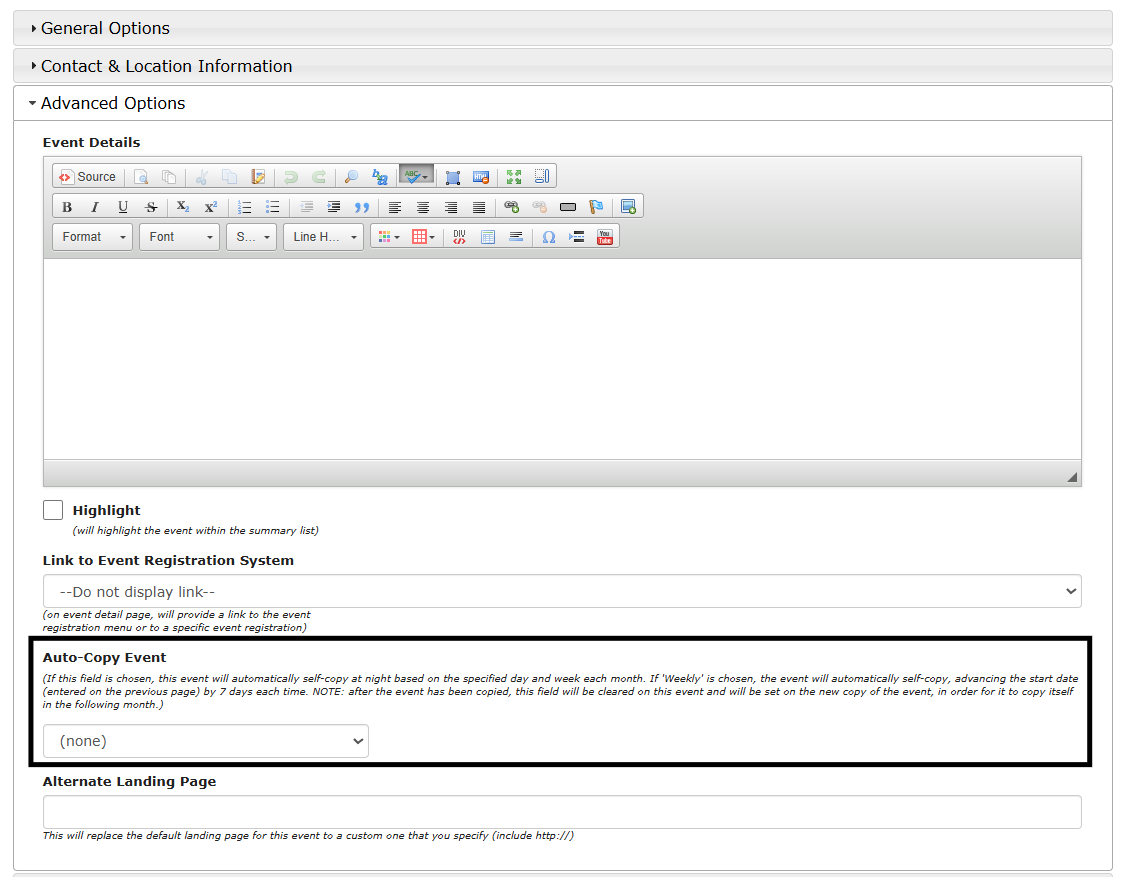

Calendar Admin: Auto-Copy
9 March 2026
Auto-Copy Event:
If this mode is enabled, the event will be automatically copied based on your specifications (i.e. 1st Monday of each month). It will copy all the event details exactly and adjust the begin date to the correct one. This is useful for events that recur on a predictable basis.
- This feature allows you to set up an event that will copy itself into the future. For example, you can set up an event to post every 3rd Tuesday.
- The copying occurs at night, where the event that is marked to copy will be copied into the future. Then that future event will be marked to copy to continue this pattern next night. This repeats each night until an event is copied out 60 days in advance (40 days if weekly copying). After this point, the event will continue to check to see if the next copied event is within that 40 or 60 day window. If it is, it will then mark the event to be copied and copy overnight, if not no new event is created. This continues until the stop date is met (if entered).
- Auto-copied events can be identified by the Auto-Copy Enabled tag underneath the title of the event, in the main event list. You can search for auto-copied events using the search bar in the calendar admin system.
You can locate the auto-copy from the Calendar Admin > edit an event > Save and Continue > Save and Continue> Advanced Options > Auto-Copy Event